

From localhost to Production: Deploy Your React App on Self-Hosted Kubernetes

From localhost to Production: Deploy Your React App on Self-Hosted Kubernetes
You’ve got a Kubernetes cluster humming along. Certificates are green. Ingress is configured. And yet, every project you build still lives at localhost:5173 like it’s paying rent there. Time to evict it.
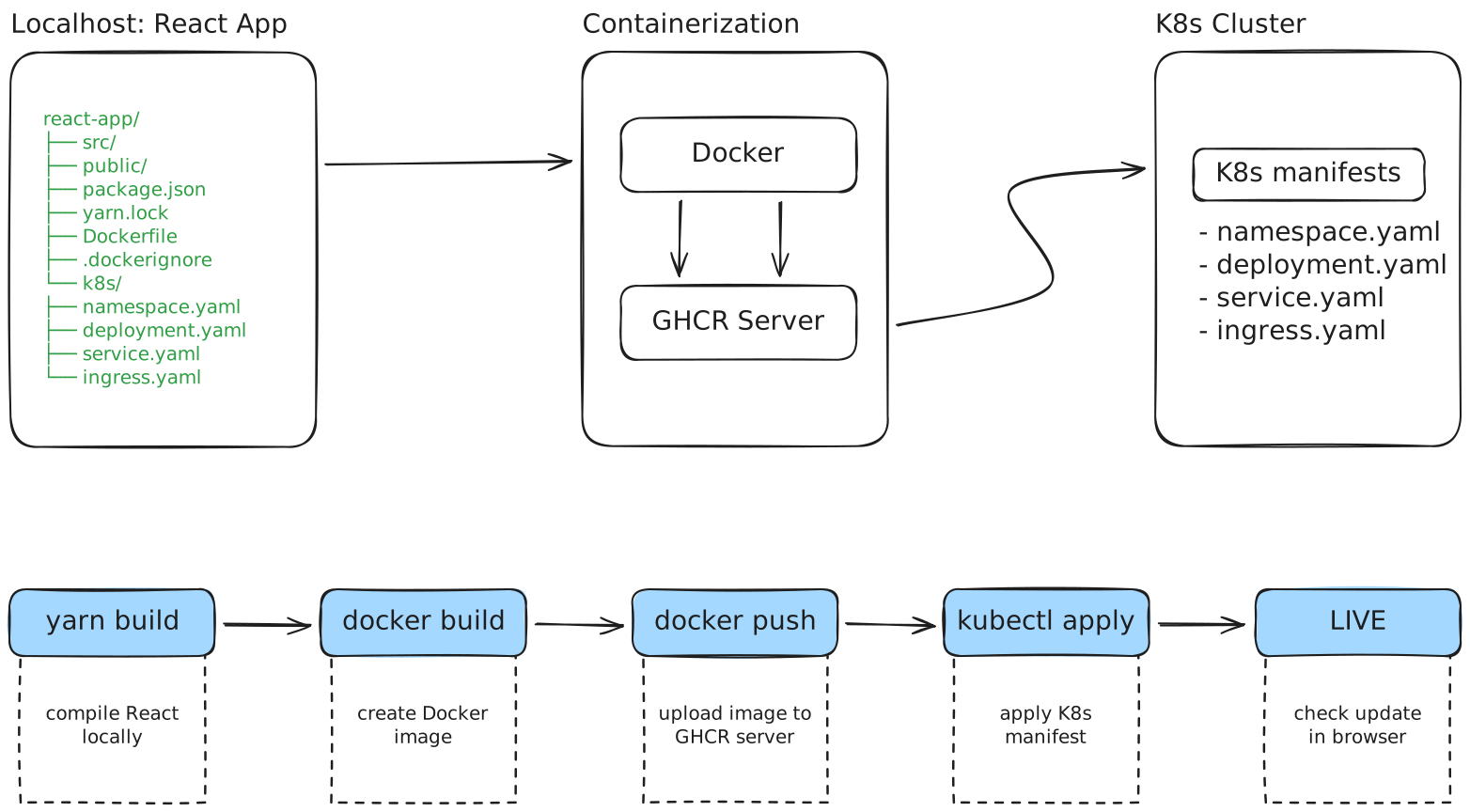
This guide walks through the actual deployment pipeline: from scaffolding a React app to pushing a container image to GitHub Container Registry (GHCR) and orchestrating it on your self-hosted cluster with TLS termination. No managed services. No cloud vendor lock-in. Just you, your cluster, and a working production URL.
Cloud providers offer convenience at the cost of control and recurring fees. A self-hosted cluster gives you full ownership of your infrastructure, predictable costs, and the satisfaction of knowing exactly where your bits live. The trade-off is operational responsibility—but if you're reading this, you've already accepted that bargain.
Init
What you need
Before diving in, ensure you have:
A working Kubernetes cluster (k3s, kubeadm, or similar)
kubectlconfigured and pointing to your clusterdockerinstalled locally for building imagesGitHub account
Node.jsandyarnfor local developmentA domain pointing to your cluster’s ingress controller
cert-managerconfigured with a ClusterIssuer (for TLS)
Apply
Create and Test Your React Project Locally
Spin up a fresh React project using Vite. The --template react flag gives you a minimal, modern setup without the bloat of create-react-app.
yarn create vite react --template react
When prompted, accept the defaults. Vite will scaffold the project, install dependencies, and drop you into a ready-to-run state.
To start project again after scaffolding
cd react
yarn dev
Then open http://localhost:5173 in your browser. You should see the default Vite + React welcome page. Congratulations—your project works. Locally. Like every other project you’ve abandoned in your ~/projects graveyard.
Prepare the Project for Docker
To ship this beyond your machine, you need a container. Create two files in your project root: a Dockerfile for the build process and a .dockerignore to keep the image lean.
This Dockerfile uses a multi-stage build. Stage one compiles your React app with Node. Stage two copies only the static output into an NGINX image. The result is a production image under 50MB instead of 1GB+ of node_modules debris.
Dockerfile
# Stage 1: Build
FROM node:22-alpine AS builder
WORKDIR /app

# Copy dependency files
COPY package.json yarn.lock ./

# Install dependencies
RUN yarn install --frozen-lockfile

# Copy source
COPY . .

# Build static files
RUN yarn build

# Stage 2: Runtime (NGINX)
FROM nginx:1.27-alpine

# Copy compiled React build to NGINX
COPY --from=builder /app/dist /usr/share/nginx/html

EXPOSE 80
.dockerignore
node_modules
build
dist
.git
.gitignore
*.log
.DS_Store
.env
.env.local
Build and Push to GitHub Container Registry
GHCR provides free container hosting tied to your GitHub account. Authenticate Docker with your Personal Access Token, build the image, and push it.
First, export your token:
bash
export GITHUB_TOKEN=ghp_your_token_here
fish
set -gx GITHUB_TOKEN ghp_your_token_here
Login to GHCR
echo $GITHUB_TOKEN | docker login ghcr.io -u YOUR_GITHUB_USERNAME --password-stdin
#                                             ↑ replace with your GitHub username
Expected output
WARNING! Your credentials are stored unencrypted in '/home/user/.docker/config.json'.
Configure a credential helper to remove this warning. See
https://docs.docker.com/go/credential-store/

Login Succeeded
Build the image with your GHCR path
docker build -t ghcr.io/YOUR_GITHUB_USERNAME/react:latest .
#                        ↑ replace with your GitHub username in lowercase
The build will pull base images, install dependencies, compile your app, and package it into the NGINX runtime. Output will show each layer being processed—grab coffee if your network is slow.
Push to the registry:
docker push ghcr.io/YOUR_GITHUB_USERNAME/react:latest
#                   ↑ replace with your GitHub username in lowercase
Once complete, your image lives at ghcr.io/YOUR_GITHUB_USERNAME/react:latest. You can verify it exists in your GitHub profile under Packages.
By default, GHCR packages are private. Either make the package public in GitHub's UI, or configure imagePullSecrets (covered next) to authenticate your cluster.
Real-world Application
Ah yes, the classic developer flex: “Check out this app I built!” followed by the crushing silence when someone asks for the URL and you mumble something about port 5173 and SSH tunnels. Your mom doesn’t want to install kubectl to see your todo app.
What follows is the unsexy middle: YAML files, registry authentication, ingress configuration. It’s not hard, but it’s not nothing. Let’s fix your localhost shame—and in the process, you’ll understand exactly why platforms like Vercel charge what they do (and why ZipOps exists as an alternative).
Step 1: Create the Namespace
Isolate your deployment in its own namespace. Clean separation, easy cleanup if things go sideways.
namespace.yaml
apiVersion: v1
kind: Namespace
metadata:
  name: test-react
And apply it as first resource
kubectl apply -f namespace.yaml
Step 2: Create GHCR Pull Secret
Your cluster needs credentials to pull from your private GHCR repository. Create a docker-registry secret:
kubectl create secret docker-registry ghcr-secret \
  --docker-server=ghcr.io \
  --docker-username=YOUR_GITHUB_USERNAME \ # <-- your username
  --docker-password=$GITHUB_TOKEN \        # <-- your token from env var
  --docker-email=YOUR_EMAIL \              # <-- your email
  -n test-react
Hardcoding secrets in version-controlled files is a security anti-pattern. The imperative kubectl create secret approach keeps credentials out of your git history. For production, consider external secret management (Vault, Sealed Secrets, External Secrets Operator).
Step 3: Deploy the Application
The Deployment resource tells Kubernetes how to run your container: which image, how many replicas, resource limits, and pull credentials.
deployment.yaml
apiVersion: apps/v1
kind: Deployment
metadata:
  name: hello-world-react
  namespace: test-react
spec:
  replicas: 1
  selector:
    matchLabels:
      app: hello-world-react
  template:
    metadata:
      labels:
        app: hello-world-react
    spec:
      imagePullSecrets:
        - name: ghcr-secret
      containers:
        - name: app
          image: ghcr.io/YOUR_GITHUB_USERNAME/react:latest
          #              ↑ replace with your GitHub username
          imagePullPolicy: Always
          ports:
            - containerPort: 80
          resources:
            requests:
              memory: "64Mi"
              cpu: "100m"
            limits:
              memory: "256Mi"
              cpu: "500m"
Step 4: Expose with a Service
A ClusterIP Service gives your deployment a stable internal endpoint that other cluster resources (like Ingress) can reference.
service.yaml
apiVersion: v1
kind: Service
metadata:
  name: react-svc
  namespace: test-react
spec:
  selector:
    app: hello-world-react
  type: ClusterIP
  ports:
    - port: 80
      targetPort: 80
Step 5: Configure Ingress with TLS
The Ingress resource routes external traffic to your service and handles TLS termination via cert-manager. This example uses Cilium as the ingress controller—adjust ingressClassName if you’re running Traefik, NGINX, or another controller.
ingress.yaml
apiVersion: networking.k8s.io/v1
kind: Ingress
metadata:
  name: react-ingress
  namespace: test-react
  annotations:
    cert-manager.io/cluster-issuer: letsencrypt-prod
    acme.cert-manager.io/http01-edit-in-place: "true"
    ingress.cilium.io/force-https: "true"
spec:
  ingressClassName: cilium
  tls:
  - hosts:
    - react.yourdomain.com                     # <-- replace with your actual domain
    secretName: react-yourdomain-com-tls
    # ↑ cert-manager will create this secret
  rules:
  - host: react.yourdomain.com                 # <-- replace with your actual domain
    # ↑ replace with your actual domain
    http:
      paths:
      - path: /
        pathType: Prefix
        backend:
          service:
            name: react-svc
            port:
              number: 80
Step 6: apply them all
Apply all resources
kubectl apply -f deployment.yaml -f service.yaml -f ingress.yaml
and verify the pod is running
kubectl get pods -n test-react
After applying the Ingress, cert-manager will initiate an ACME HTTP-01 challenge to verify domain ownership and issue a certificate. This typically takes 30~90 seconds. Monitor progress with kubectl get certificate -n test-react
Wait until READY shows True, before accessing your site
Once the certificate is ready, navigate to https://react.yourdomain.com. Your React app—the same one that lived at localhost an hour ago—is now live on the internet with proper TLS. Send that URL to your mom.
You just wrote 5 YAML files, configured registry secrets, and waited for certificate provisioning. ZipOps reduces this to: run zipops -→ set values -→ deploy. Same Cilium ingress, same Let's Encrypt certs, zero manifests. See the workflow →
Deploying Updates
Changed some code? Here’s the update workflow:
Modify and test locally
yarn dev
verify changes at http://localhost:5173
Rebuild and push the image
   docker build -t ghcr.io/YOUR_GITHUB_USERNAME/react:latest .
   docker push ghcr.io/YOUR_GITHUB_USERNAME/react:latest
Restart the pod to pull the new image
kubectl rollout restart deployment/hello-world-react -n test-react
The imagePullPolicy: Always setting ensures Kubernetes fetches the latest image on every pod restart. For production, consider using versioned tags instead of latest to enable proper rollback.
Project Structure
After completing this guide, your project looks like this:
react-app/
├── src/                          # Your React source code
├── public/
├── package.json
├── yarn.lock
├── Dockerfile                    # Multi-stage build → NGINX
├── .dockerignore                 # Keeps image lean
└── k8s/                          # Kubernetes manifests
    ├── namespace.yaml
    ├── deployment.yaml           # Pod spec + GHCR pull secret ref
    ├── service.yaml              # ClusterIP for internal routing
    └── ingress.yaml              # TLS termination + domain routing
The k8s/ directory is optional organization—you can keep manifests anywhere. What matters is they exist and you can kubectl apply them.
What this costs
Approach | Monthly Cost | What You Get |
|---|---|---|
Self-hosted (this guide) | $0 * | Full control, no vendor lock-in, unlimited deployments |
ZipOps | ~$100 one-time * | Tools to quickly provision production-grade clusters, then unlimited everything |
Vercel Pro | $20/user | Managed hosting, limited build minutes, vendor-specific config |
AWS Amplify | ~$15-50+ | Auto-scaling, but AWS billing complexity and potential surprise costs |
Netlify Pro | $19/user | Similar to Vercel, bandwidth limits apply |
Azure Static Web Apps | $9+ | Microsoft ecosystem integration, metered bandwidth |
* Assuming you already have a running cluster. Hardware/VPS costs are yours, but they’re fixed and predictable—not per-deployment or per-bandwidth.
The real cost of self-hosted isn’t the $0 line item—it’s the 50 minutes you just spent that you’ll spend again on every new project. ZipOps runs on the same infrastructure at similar cost, but you get that time back. Compare what’s included →
Self-hosting costs time. You're the SRE now. Certificate renewals, security patches, cluster upgrades—that's on you. The enterprise alternatives trade money for someone else handling that operational burden. Choose based on what you value more: autonomy or convenience.
What’s next
You’ve got a cluster, TLS, and a deployed React app. Here’s where to go deeper:
CI/CD Pipeline with GitHub Actions — Automate the build-push-deploy cycle so every merge to main triggers a production update without manual commands. Part 2 of this series covers the complete workflow. Get notified when it drops →
Environment-Specific Configurations — Manage staging vs production deployments using Kustomize overlays or Helm values files for environment variables and resource limits
Monitoring and Observability — Deploy Prometheus and Grafana to track pod health, resource consumption, and request latencies across your applications
Database Deployment with Persistent Storage — Add PostgreSQL or MySQL to your cluster with
PersistentVolumeClaims, turning your frontend-only deployment into a full-stack application
The point
A Kubernetes cluster without workloads is just expensive electricity. This guide covered the complete path from yarn create vite to a TLS-secured production URL: containerizing with Docker, pushing to GHCR, and orchestrating with Kubernetes resources—Namespace, Secret, Deployment, Service, and Ingress.
Your cluster is no longer a homework assignment. It’s infrastructure serving real applications on real domains. That’s the difference between learning Kubernetes and using it.
📬 Want more infrastructure deep-dives? Subscribe to our newsletter for guides on Kubernetes, self-hosting, and escaping cloud vendor lock-in. No spam, just infrastructure.